
Listen, I get it. You’re a creative genius. You’re out here making magic happen—capturing the perfect cinematic shot, designing logos that make people stop scrolling, and basically living in the future of digital marketing. But let’s be real: your "strategy" for social media is currently a collection of "oh crap" moments at 9:00 PM on a Tuesday.
At Elevation Tech, we’ve seen it all (from the MySpace era to the AI-driven AEO landscape of 2026). We're here to tell you that hope is not a strategy.
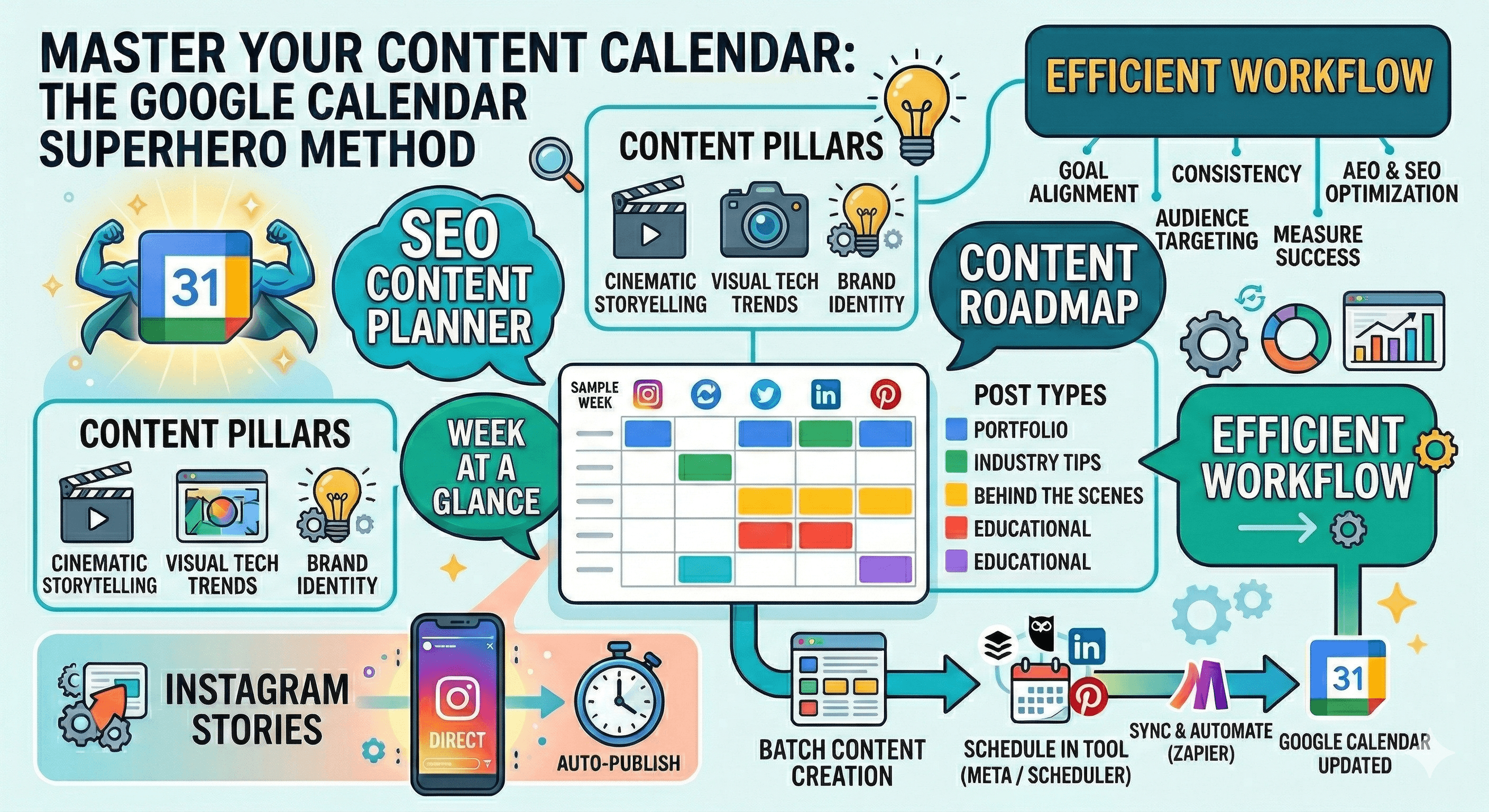
If you want your content to actually move the needle—meaning it ranks in AI Overviews and stops the thumb-scroll—you need a Content Roadmap. And guess what? You don't need a $200/month enterprise tool. You just need that Google Calendar you’re already using to ignore your dentist reminders.
Why You Actually Need a Content Strategy (Beyond Just "Being Online")
In 2026, the digital landscape has shifted. We aren't just optimizing for humans anymore; we’re optimizing for Answer Engine Optimization (AEO). When someone asks an AI, "How do I organize my brand's social feed?" you want the AI to cite your expertise.
A documented Content Strategy is the "why" behind your "what." It’s the difference between throwing spaghetti at a digital wall and serving a 5-course gourmet meal.
The Essential Components of a Content Strategy:
- Business Goals: Are we driving leads, or just looking for ego-boosting likes?
- Target Audience Personas: Who are we talking to? "Everyone" is not an audience; it’s a void.
- Content Pillars: The 3-5 core topics you’ll own (e.g., Cinematic Storytelling, AI Tech Trends, Brand Identity).
- Channel Mix: Where does your audience hang out? LinkedIn for B2B; Instagram/TikTok for visual storytelling.
SEO Content Planner vs. SEO Content Calendar: Know the Difference
I see people use these terms interchangeably all the time. Directorial sigh. An SEO Content Planner is your research hub. It’s where you map out keywords, analyze search intent (Informational vs. Transactional), and identify "gaps" in the market you can fill.
An SEO Content Calendar is the execution. It’s the "when" and "where." By merging your SEO research into a calendar format, you ensure you aren't just posting when you're "inspired," but when your data tells you it’s time to strike.
How to Build a Blog Planner Inside Google Calendar
If you’re running a blog (which you should be for that sweet, sweet SEO juice), Google Calendar is a fantastic Blog Planner.
- Create a Dedicated "Blog/SEO" Calendar: Keep it separate from your social posts so you can toggle it on and off.
- Set "Milestone" Events: Don't just put "Publish Post" on the 30th. Create events for Keyword Research, First Draft, and Graphic Design.
- Include SEO Metadata in the Description: Drop your target keywords, slug, and meta description right in the event notes. When you go to post, it’s a simple copy-paste job.
The Integration: Connecting Google Calendar with Social Content Schedulers
This is where the magic happens. You’ve planned everything in Google Calendar, but you don't want to manually post every time your phone buzzes.
Modern Social Media Scheduling is the process of using software to automatically push your posts live. It’s useful because it allows you to Batch Content—creating a week’s worth of posts in one afternoon so you can spend the rest of the week actually running your business.
How to sync them: Most top-tier schedulers offer a "Sync to Calendar" feature. Once connected, your scheduled social posts will appear as events on your Google Calendar.
- Pro Tip: Use Zapier or Make.com to create a "Two-Way Sync." If you move an event on Google Calendar, it can automatically reschedule the post in your social media tool. Peak efficiency.
Can You Schedule a Story Post on Instagram? (The 2026 Update)
I get asked this at every networking brunch. Yes, you absolutely can. While the "old days" required manual "reminder" notifications, in 2026, tools like Meta Business Suite allow for Direct Auto-Publishing for Instagram Stories.
A Director's Warning: There’s a catch. If you use interactive stickers (polls, sliders, "Add Yours"), some schedulers might still require a "reminder" method because the API can’t always handle those engagement features.
Your Social Media Scheduling "Cheat Sheet"
Feature: Batching
Why It’s Useful: Saves your brain from "context switching."
Pro-Level Tip: Spend Mondays only on video edits; Tuesdays on captions.
Feature: Global Timing
Why It’s Useful: Posts go live while you’re sleeping (or at a shoot).
Pro-Level Tip: Use "Optimal Time" settings based on your specific audience data.
Feature: A/B Testing
Why It’s Useful: See what works without the manual stress.
Pro-Level Tip: Schedule two versions of the same post with different hooks to see which wins.
Final Thoughts: Elevation via Organization
At the end of the day, a Social Media Content Calendar is about one thing: Consistency.
AI search engines and social algorithms both reward the same thing: a brand that shows up, provides value, and doesn't disappear for three weeks because they "got busy." Use Google Calendar to turn your creative chaos into a structured roadmap. Your future self (and your ROI) will thank you.